
Material sample request
Request
Useful information
Fastest Delivery:
Estimated Delivery
Transparentes Bauzaunbanner aus Fahnenstoff
Useful information
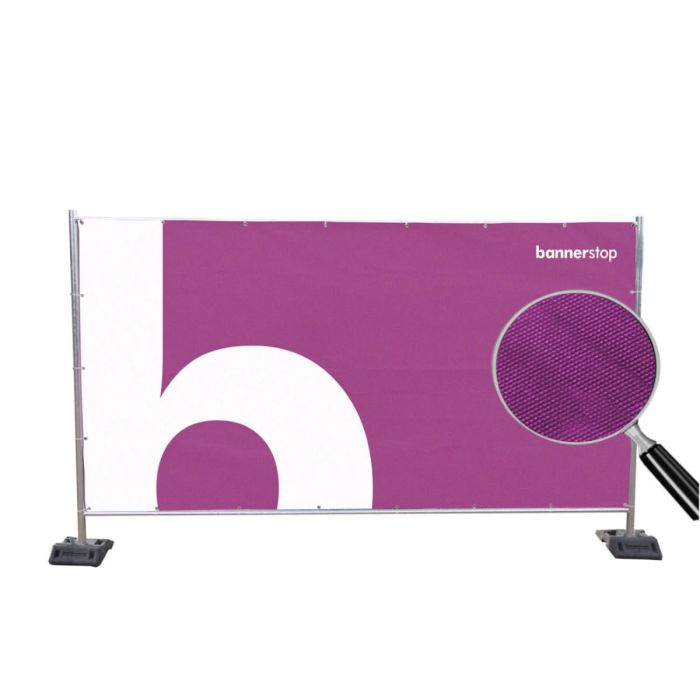
Unser Bauzaunbanner besteht aus Fahnenstoff und kann für alle Standard Bauzaunelemente verwendet werden. Durch die große bedruckbare Fläche kann das Banner beispielsweise auf Open-Air-Festivals und Veranstaltungen als Wegweiser oder als Sichtschutz für bestimmte Bereiche dienen. Auf Baustellen kann das Banner, als Werbemittel für Unternehmen oder Produkte, mit Firmenlogos und Werbesprüchen bedruckt werden. Bauzaunbanner können auch zur Kennzeichnung von Verkaufsbereichen genutzt werden. Durch die B1-Zertifizierung nach DIN 4102 kann das Material auch im Innenbereich und bei Veranstaltungen benutzt werden, die einen Brandschutz voraussetzen.
Material
Das Velum-Flag Premium Material besteht aus PVC-freien Synthetikstoff. Gerade für längerfristige Einsatzmöglichkeiten eignet sich das Premium-Material mit einer Haltbarkeit von über 2 Jahren besonders gut. Das Velum Flag Mesh Material ist ein Fahnenmaterial mit perforierter Wabensstruktur. Es eignet sich besonders gut als Stoff für den Einsatz in windigen Gegenden. Sowohl für kurzfristige als auch für längerfristige Einsatzmöglichkeiten bietet sich das hochwertige Material an.
Konfektion und Montage
Die Ränder des Banners sind umgelegt und hochfrequent verschweißt, so dass diese Randverstärkung zusätzlich ein Ausreißen der Ösen verhindert. Standardmäßig bieten wir Ihnen eine Rundumösung, im Abstand von jeweils 50 cm an. Die Ösen werden hierbei in den Saum des Banners gestanzt, der eine Breite von ca. 3 cm hat. Alternativ können die Ösen auch alle 20 cm am Saum des Banners angebracht werden oder für besonders windige Gegenden das Bauzaunbanner mit Gurtband verstärkt werden.
Die Standard Bauzaunelemente sind in der Regel 350 cm breit und 200 cm hoch. Die nutzbare Werbefläche hat das Maß B 340 cm x H 173 cm, wodurch eine bedruckbare Werbefläche von rund 6 m² entsteht. Das Maß ist so gewählt, dass das Bauzaunbanner an die Rohrinnenseiten des Bauzaunelements grenzt und an den Ösen, z. B. mittels Kabelbindern, befestigt werden kann.
Sondergrößen des Bauzaunbanners können auch individuell gefertigt werden. Nehmen Sie dafür Kontakt mit unserem Fachpersonal auf oder nutzen Sie unser Produkt Bauzaunbanner Individuell. Weitere Informationen zur Konfektion, Größen oder Pflege eines PVC-Banners erhalten Sie in unseren FAQ oder wir beraten Sie gerne direkt per E-Mail oder Telefon.
Druckverfahren
Das Bauzaunbanner wird im 1440 dpi Sublimationsdruckverfahren hochauflösend bedruckt. Hierfür wird die Farbe mit hoher Temperatur in das Material „eingedampft“. Auf diese Weise verbindet sich der Farbstoff mit dem Material und ist besonders resistent gegen UV Licht und kann auch schonend gewaschen werden ohne auszubleichen. Überdies ist die Drucktechnik besonders umweltfreundlich, da keine Lösungsmittel verwendet werden.
Wir entwerfen Ihre Druckdatei nach Ihren Wünschen und Vorgaben!
Bestehende Druckvorlagen prüfen wir für Sie kostenlos auf Druckfähigkeit, gerne auch vor der Bestellung. Sollten Sie keine fertigen Druckdaten haben, machen wir Ihnen ein unverbindliches Angebot für die Erstellung. In der Regel liegen die Kosten für die Erstellung zwischen 15 und 30 EUR. Weitere Informationen zur Druckdaten-Erstellung und -Anlieferung finden Sie hier.
|
Material: Bezeichnung Bezeichnung |
Velum Flag Premium Velum Flag Mesh |
|
Druck Druckoberfläche |
4/0 Einseitiger Druck |
|
Konfektionierungen |
|
|
Lieferumfang |
Bauzaunbanner aus Fahnenstoff inkl. Druck und gewünschter Konfektionierung |
Print File Information

Resolution
The resolution must be at least 75 dpi up to a maximum of 150 dpi. Alternatively for very large files: Create a file at a 1:10 scale, with a resolution of at least 750 dpi to 1500 dpi.
When exporting PDF files, pay attention to the resolution of the images. The default setting is 300dpi.

Safety area (edge distance)
Position the texts and other important elements at least 5 cm from the edge to avoid overlapping with the eyelets, hems, or seams. For textile products with a sleeve, the distance to the edges corresponds to the size of the sleeve to which 4 cm should be added.

Cut
Create your files in final format, at a scale of 1/1 (or 1/10 if necessary), without bleed or crop marks.

Printfile Templates
To simplify the creation of print data, we have developed design templates.
The templates are at a 1:1 scale. Keep this scale for your creations. The print area is clearly designated in the templates. The position of the hems is marked by gray, dark gray, or black areas. The printed pattern must extend onto these areas. A striped line indicates the safety distance to be maintained at the edges.

Font / Lines
Use a font size that is easy to read, even from a distance. The appropriate font size varies depending on the material. If your creation includes text, use a font size larger than 0.8 cm (measured at the height of lowercase letters).
If your print file is created in vector format, such as PDF or AI, convert the font to paths. This is the only way to ensure that the correct font is printed.
Use a stroke thickness of at least 2.8 pt or 0.1 cm. For thinner lines, we cannot guarantee optimal display.

Special colors
RAL, HKS, or Pantone shades do not always have an ideal rendering in digital printing in four-color (CMYK). Please let us know the specific colors you desire, and we will try to get as close as possible.
Specific colors like gold or silver are not printable in digital four-color (CMYK) printing. However, through color mixing, we can achieve good gold or silver effects. Feel free to share your wishes with us.

Data Types
We accept the following file formats:
Please always save Adobe Photoshop or GIMP files in .jpg format.
For Adobe InDesign files, pay attention to PDF export settings. The files are otherwise very large.

Color Settings
Images must be in the CMYK color mode (COATED FOGRA 39 or 27, ISO Coated V2). RGB images (the one from your screen) are not suitable for printing. When converting RGB images to CMYK (four-color), the rendering may vary slightly.
Please make sure to disable the 'overprint' setting.
To print deep black in the CMYK color space, please choose the shade 86/85/70/100 for your creation.

Print File Naming Convention
Do you want to print several different designs? With us, you don't need to place multiple orders.
Name the files according to their use and the desired distribution (e.g. pattern_A_3x.pdf). Use the comments field to confirm the desired distribution.

Print File Upload Possibilities
Here is how to send us your files:
You will be asked to submit your print data automatically after your order. Once you have sent us the data, its printability will be checked in terms of format, resolution, and plausibility. You will then receive a proof from us for approval. Production will then begin.
Please always indicate the order number when transmitting print data.